"Build me an app."
Claude guesses a stack, fakes the data, and hands you a demo that breaks on the second click.
Day 4 · App Build · Bonus
Today is not "ask Claude Code for an app." It is seven beats that take one annoyance to a planned, deployed tool with a real backend and a real share link. Not a finished product. A real, small thing that is live by the time we close.
Downloads
The prompts we paste live, the demo data, and the take-home kit. Grab them now so you are not hunting while we build.
The calculator and Showcase prompts are fish. This is the rod. Paste it, answer a few questions, and it writes a build-ready kickoff prompt for YOUR app. Your idea matters less than the pattern, and this is the pattern, packed into one prompt you keep.
Use it. Paste it into Claude Code, Claude.ai, or any capable model. Answer the short interview. It hands back one detailed prompt you can paste straight into a build.
The prompt for the build we make together: a premium way to present creative to a client and collect feedback on one share link. Long on purpose.
Download prompt Warm-upBlank folder to a live Facebook Ads calculator. Reads the file first, plans before it builds, fully static.
Download prompt Demo dataA real-shaped Meta Ads export to build the calculator around. Drop it in the folder before you run the prompt.
Download .xlsx Make it beautifulTwo premium 21st.dev components (video upload card, flip-reveal gallery) and the prompt that wires them into the real app.
Download file PolishThe end-of-build pass that gives the whole app one premium brand language. The exact recipe behind the Showcase look.
Download file For MondayThree prompts that make Claude own the Git, branch, check, and review loop when you build for real.
Download fileThe build checklist
Same idea as Website Day. Hit these in order and the app stays small, real, and shippable instead of sprawling into a half-built demo.
A real, specific drain an app would kill. A cool idea builds a demo nobody opens twice.
The cap is the gift. The sixth feature is why so many v1s die at sixty percent in the drawer.
Name the three to five fields and what one record looks like. Schema churn means painful redeploys later.
Plan mode writes the plan before code. Set up Git so you can roll back. One sharp adversarial pass, then rewrite.
A backend, secrets handled right, and the share link opened logged out. Is the data real, mocked, or a fallback?
A static app deploys anywhere. A backend app deploys the front end and the backend separately. The URL is the receipt.
Paste-along workbook
Collapsed for reading. Open a step when you want the exact prompt or the links. Each one has a copy button.
This is the Prompt Architect. It interviews you, then writes one detailed kickoff prompt for your app. If you do not have your own idea yet, skip it and build the Showcase with the group.
You are my Prompt Architect. Your job is to turn my rough app idea into a single, detailed, build-ready prompt that I can paste into Claude Code to build the app well on the first try. You are NOT building the app. You are writing the prompt that builds it.

A great build prompt always has these eight parts. You will produce all eight, even for the parts I am vague about. Where I am thin, fill the gap with a sensible default and clearly label it as an assumption.

1. The job. One sentence on what the app does and who it is for.
2. Read the source first (only if I have a file or data to build around). Tell the builder to open and inspect the file, its columns and a few rows, before writing any code.
3. Plan first. Tell the builder to ask clarifying questions, then show me the plan, the data model, and the stack, and to NOT write code until I approve.
4. The stack. A concrete stack with a default, and whether the app is static (everything runs in the browser, no backend) or needs a database, accounts, or file storage. Name the deploy implication: a static app deploys anywhere including GitHub Pages, while a backend app needs environment variables and is NOT a static site.
5. The data shape. The entities and their fields, named explicitly. This is the most important part. If I am vague, propose a clean data model and ask me to confirm it.
6. v1 features. A short numbered list, MVP first, capped at about five, with the instruction to get the core flow working end to end before any polish.
7. v2 parked. What to leave out of v1 but leave room for in the data model.
8. Guardrails and prove-it. The hard constraints (for example: secrets go in .env and host settings, never in chat; do not run images or video through an AI model; everything client side if the app is static; handle empty and error states without crashing). Then a specific prove-it close: "when it works, prove it to me by doing X, Y, and Z live, and show me the behavior, not a description."

Process:

First, interview me. Ask these a few at a time and stop to let me answer. Do not dump all nine at once.
- In one sentence, what is the app and who uses it?
- What is the single core flow that absolutely has to work?
- Do you have a file or data source to build around? If so, what is in it?
- What does the app need to remember between visits? (I will help you turn this into a data model.)
- Does it need accounts, a database, or to store uploaded files, or can everything live in the browser?
- What are the three to five must-have features for v1?
- What is explicitly NOT in v1?
- Any hard rules, constraints, or things to avoid?
- How will we know it actually works?

If I say "just generate it" or my answers are thin, proceed anyway using sensible defaults and label every assumption.

When you have enough, output ONLY the final build prompt, inside a single code block, written in plain second person to the builder ("I want to build...", "before you write code...", "when it works, prove it to me..."). It must be specific and self-contained, so I never have to explain the eight parts myself. After the code block, list in one or two lines the assumptions you made, so I can correct them. Do not build the app, and do not add commentary inside the code block.The app has to kill one recurring drain. If the drain is vague, the feature list sprawls. Let Claude play it back to you before anything gets built.
I want to turn a recurring annoyance into a small app. Before any code, interview me:
- what is the specific task I rebuild or dread every week?
- who is it for, just me or other people too?
- what are the three to five must-have features for a real v1?
- what is explicitly NOT in v1?

Then play it back to me as: the annoyance in one sentence, a five-feature 1.0, and the short list of what is NOT in v1.

Push back if my idea is really a cool idea instead of a real annoyance, or if my feature list is longer than five. We are not building a demo.
Do not write code yet.Before any code, name what the app stores. Schema churn later forces redeploys, so a few minutes here pays off all day.
Before we build, let's name what this app stores.

Ask me what one record looks like, then propose a clean data model: the entities, and for each one its three to five fields.

Keep it minimal. If something is vague, propose a sensible default and label it as an assumption.

Show me the data shape and wait for my OK. Do not write code yet.Plan mode (shift+tab) makes Claude interview you and write the plan before touching code. The Git line is cheap insurance the moment a build goes sideways.
We are going to plan before we build.

First, turn on plan mode (shift+tab), interview me, then write the full plan: the chosen stack, the data model, and the deploy target. No code yet.

Also: create a git repo and commit now, and keep committing after each change, so I can always roll back.

Do not start building until I approve the plan.One sharp pass gets most of the value without the time sink. Run it, then have Claude rewrite the plan.
Before we build, attack this plan. Destroy it.

Find every flaw, every risky assumption, every place it will break or balloon in scope. Assume nothing.

Then rewrite the plan addressing what you found. I want the sharp version, not the polite one.Advanced: run that same pass through Codex (the codex-exec skill, or your review command) for a real second-model opinion. Claude does not push back hard enough on its own work. A different model will.
Open a brand-new empty folder. Drop in a Facebook Ads export (the demo file below, or any Meta export). Then paste this. It reads the file first and plans before it builds.
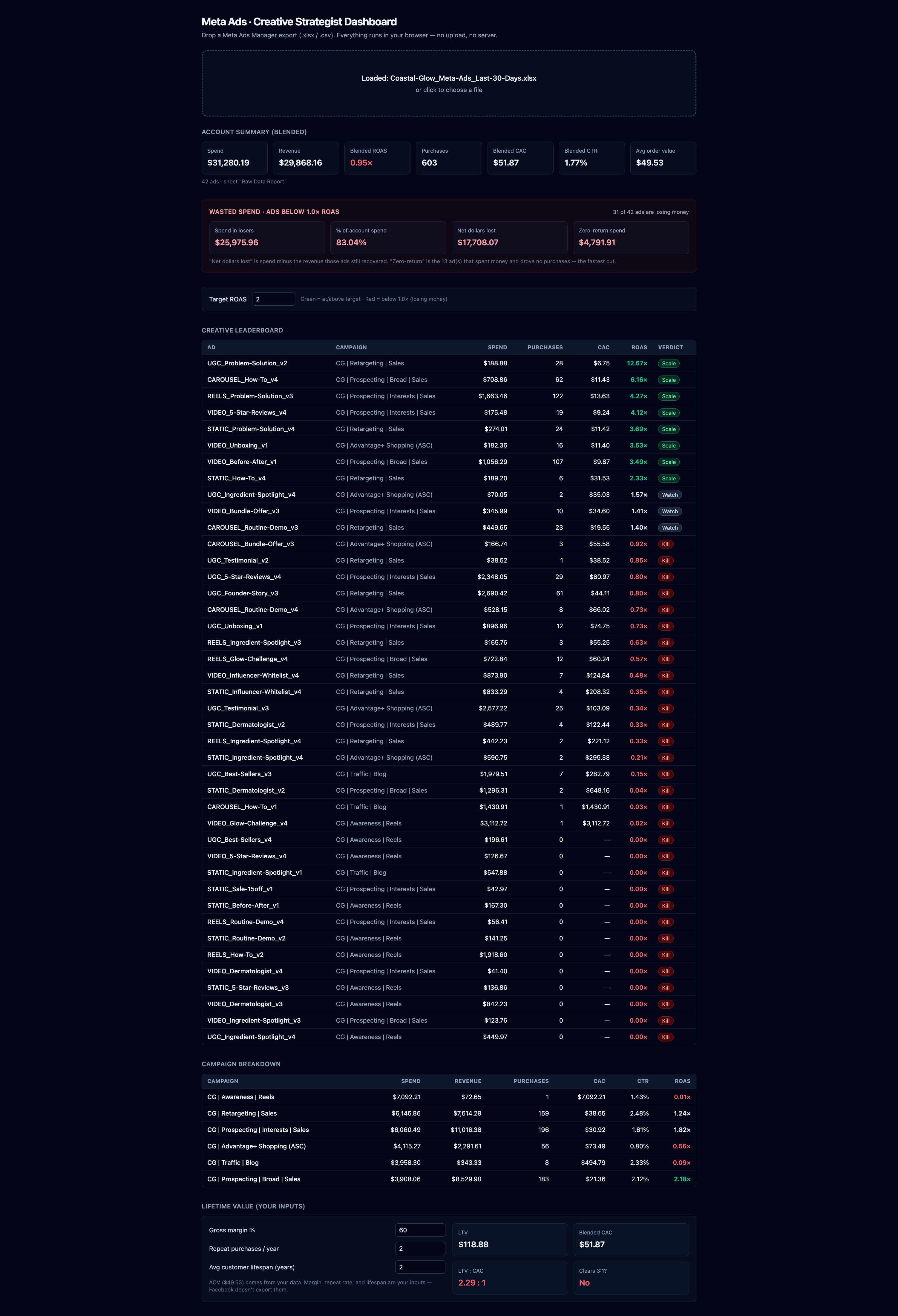
I just put a Facebook Ads export in this folder (an .xlsx from Meta Ads Manager). I want to build a small web app that turns this kind of export into a creative-strategist dashboard: it reads the spend and results and tells me my blended numbers, which creatives are winning, and which are wasting money.

First, open the file and look at the columns and a few rows so you understand the real shape of the data. Then, before you write code, show me (1) the plan, (2) which columns you will use, and (3) the stack. Do not build until I approve.

Stack (keep it simple and fully static so it deploys anywhere):
- Vite + React + TypeScript + Tailwind
- Parse the spreadsheet in the browser with the SheetJS (xlsx) library. No backend, no database, no server.
- It should accept ANY Meta Ads export the user drags in, not just this one file.

The data is a Meta Ads export, one row per ad. The columns you will find include:
- Campaign name, Ad set name, Ad name
- Amount spent (USD), Impressions, Reach, Link clicks, CTR (link click-through rate)
- Purchases, Cost per purchase (USD), Purchases conversion value (USD), Purchase ROAS (return on ad spend)
Map columns by their header text, and be resilient to small naming differences and blank cells.

What to compute and show (v1, MVP first, get the upload-to-numbers flow working before any polish):
1. A drag-and-drop upload area. Drop the .xlsx, parse it, render the dashboard.
2. Account summary (blended): total spend, total revenue (conversion value), blended ROAS, total purchases, blended CAC (spend divided by purchases), blended CTR, and average order value (revenue divided by purchases).
3. A target input: let me set a target ROAS (default 2.0) and use it to label every ad.
4. Creative leaderboard: a table of ads sorted by ROAS, showing spend, purchases, CAC, and ROAS. Color winners (at or above target) green and losers (below 1.0) red, so I can see at a glance what to scale and what to kill.
5. Campaign breakdown: the same blended metrics grouped by campaign.
6. LTV panel: let me enter gross margin percent, repeat purchases per year, and average customer lifespan in years. Use the average order value from the data to compute LTV, then show the LTV to CAC ratio and a simple read on whether it clears 3 to 1. Facebook does not export margin or repeat rate, so these are my inputs.

Guardrails:
- All client side. No data leaves the browser. No backend, no API keys, no .env.
- Handle missing or zero values without crashing (an ad with zero purchases has no CAC, show a dash).
- Keep it MVP. The upload-to-numbers core flow working end to end matters more than charts.

When it works, prove it to me with the file in this folder: upload it and show me the blended ROAS, the single top creative by ROAS, and that the zero-result ads are flagged as losers. Show me the live behavior, not a description.The export gives you CAC and ROAS directly. True LTV needs margin and repeat rate, which Facebook does not export, so the app asks you for those as inputs.
A premium way to show ad creative to a client, brand it for them, and collect their feedback on one share link. The prompt is long on purpose. That length is why the first build comes out usable instead of generic, so read it before you run it.
I want to build a web app called Showcase: a premium way for a creative strategist or agency to present ad creative and brand ideas to a client.

The core job: I (the creator) log in, create a branded board for a specific client, upload or link the creative (images and video), organize it, and send the client ONE public link. The client opens it on any device, sees a beautiful branded gallery, and can favorite, comment, and approve individual pieces. I see their feedback. The client never logs in.

Before you write any code: ask me anything you need, then show me (1) the plan, (2) the exact data model (the Convex schema, tables and fields), and (3) the stack. Do not start building until I approve the plan.

Stack (use this unless you have a strong, stated reason not to):
- Next.js (App Router) + TypeScript + Tailwind
- Convex for the database, file storage, and real-time updates
- Convex Auth for the creator login (the client never logs in)
- Deploy the frontend to Vercel; the Convex backend deploys with its own CLI

Setup, the easy part (do this first so I never hunt for keys):
- Run `npx convex dev`. It creates the backend project for me and writes the deployment URL into .env.local automatically. No dashboard, no copying keys out of a settings page, no secrets pasted into this chat. Walk me through this one command when we start.

Data shape (define this as the Convex schema first, this is the foundation):
- profile: the creator, from Convex Auth
- board: one client showcase. Fields: ownerId, clientName, slug (random unguessable share token), logoStorageId, primaryColor, accentColor, headline, introMessage, createdAt
- section: a group inside a board, for example "Concept A", "Static ads", "Video". Fields: boardId, title, position
- item: one piece of creative. Fields: boardId, sectionId, type ("image", "video", or "embed"), storageId (for an uploaded file) or sourceUrl (for a pasted link), title, caption, position
- feedback: a client reaction to an item. Fields: itemId, boardId, kind ("favorite", "comment", "approve", or "request_changes"), commentText, clientLabel, createdAt
- brandKit: a saved client brand the creator can reuse. Fields: ownerId, clientName, logoStorageId, primaryColor, accentColor. Applying a brand kit to a new board auto-fills its branding.

Access model (in Convex this is the functions, not row policies, which keeps it simpler):
- Creator actions (create, edit, delete boards, sections, items, brand kits) are mutations that require an authenticated user and check ownerId.
- A PUBLIC query getBoardBySlug returns a board with its sections and items for the client view. No auth. Knowing the slug is the access.
- A PUBLIC mutation addFeedback lets anyone with the slug favorite, comment, or approve by passing just a name (clientLabel). No login. Only the creator can read all the feedback for their own boards.
- Files live in Convex file storage. The creator uploads through a generated upload URL and the item stores the returned storageId; the gallery serves the file URL.

v1 features (build these, MVP first, get the core flow clickable end to end before any polish):
1. Creator auth by email (Convex Auth).
2. Create a board, set the client name and brand: logo upload plus two colors. The whole board re-themes to those colors. This moment should feel like magic. Let me SAVE that brand as a reusable brand kit, so the next board for this client themes in one click.
3. Add items: image upload, video upload, or paste a hosted video URL (YouTube, Vimeo, or a CDN link). Group items into sections and reorder them.
4. The client view at /b/[slug]: ONE shareable link. The client enters just their name (no login) to leave feedback, or you flip the board's "allow feedback" toggle off for a view-only share. The view is a clean, responsive masonry gallery, lightbox on click, lazy loaded, wearing the client's branding, with a header (logo, headline, intro message).
5. Per-item client feedback with no account: favorite, comment, and a clear Approve or Request changes. Because Convex is real-time, these show up on my dashboard live. They roll up into a board status the creator sees at a glance (for example, 6 of 8 approved).
6. A creator dashboard that lists my boards with a copy-share-link button, each board's current approval status, and a feedback view showing every client reaction.

The three upgrades in features 2, 4, and 5 (the reusable brand kit, the name-gated feedback on a single share link, and Approve / Request changes with a board rollup) are what separate a real client tool from a plain gallery, so treat them as core, not nice-to-have.

v2 (do NOT build now, just leave room in the schema): password gate, downloads, QR code, view analytics, custom domain, drag-and-drop reorder polish.

Technical guardrails:
- Images: use next/image with lazy loading, the sizes attribute, and a blur placeholder. Do not load full resolution for thumbnails.
- Video: serve uploaded files with a native video tag, or embed pasted URLs. Do NOT process, transcode, or send video through an AI model. Note that Convex HTTP actions cap around 20MB, so for large videos prefer the paste-a-URL path.
- Keep all access in Convex functions: public read by slug, public feedback insert, everything else checked against the authenticated ownerId.
- The Convex CLI writes the deployment URL to .env.local for me. Do not put any secret in this chat. Any other key goes in .env.local.
- Keep it MVP. I would rather have the core flow working end to end than every feature half built.

When the core flow works, prove it to me, do not just describe it: create a board, brand it, add one image and one video, open the share link in a private window while logged out, favorite an item and leave a comment as the client, then show me that feedback appear on my dashboard live.Convex gives you the database, file storage, and real-time updates, and the setup is one command that writes its own keys. No dashboard key hunt. Watch Claude refuse to take a secret in chat. That is the secrets-discipline beat happening live.
Let's stand up the backend now. Run me through `npx convex dev` one step at a time. It should create the Convex project and write the deployment URL into .env.local automatically. Do not put any secret in this chat.

Then turn my data model into the Convex schema, and build the access as functions:
- a public getBoardBySlug query for the client view
- a public addFeedback mutation (favorite, comment, approve, request changes, with just a name)
- creator mutations that require a signed-in user and check ownerId

After it is wired, add one real item and show me it land in the Convex dashboard, not just in the chat. Because Convex is real-time, my creator dashboard should update live.Upload a logo and two colors and the whole board re-themes. Save it so the next board for that client themes in one click.
Add client branding to a board: a logo upload and two colors (use the Halo demo: teal #14B8A6 and coral #FB7185). When I set them, re-theme the whole board to those colors live, on screen.

Then let me SAVE that as a reusable brand kit, so the next board for this client themes in one click.

Show me the re-theme actually happen, do not just describe it.Core app working? Now make it beautiful. One command pulls in a premium animated component from a library and Claude wires it into the real app. Make-it-work and make-it-beautiful are separate passes, and the order is the lesson.
The core Showcase app works. Now make it look premium by dropping in two components from 21st.dev. Install each, then wire it into the real app. Do not leave them as isolated demos.

1. Video upload card, replacing the current add-item upload UI in the board editor:
   npx shadcn@latest add https://21st.dev/r/isaiahbjork/video-upload-card
   The stock component only simulates upload with a local object URL. Rewire its file handling to the EXISTING Convex upload path (request an upload URL, POST the file, store the returned storageId on a new item), while keeping the drop animation. Install framer-motion if needed. The card uses shadcn theme tokens (bg-card, text-foreground, border-border, bg-destructive) and the cn util at @/lib/utils, so if the project is not shadcn-initialized, run npx shadcn@latest init or map those tokens to the Tailwind v4 theme, or the card renders unstyled.

2. Flip-reveal grid, for the client gallery at /b/[slug]:
   npx shadcn@latest add https://21st.dev/r/paceui/flip-reveal
   Use it so that when the client filters the gallery by section (or toggles favorites-only or approved-only), the items animate into place with the GSAP Flip transition. Install gsap and @gsap/react if needed.

Keep everything else working. Then prove it: upload a video through the new card and confirm it lands in Convex file storage, then open the share link and filter the gallery to watch the items animate.power-design is the design skill from Website Day. Point it at the whole app: borrow a premium brand language, kill every gradient, commit to one scarce accent. This is exactly how the Showcase demo got its dark-gallery glass look.
Use the power-design skill on this whole app.

Pick one premium brand language from its library (Linear, Apple, Notion, and so on) to borrow the feel.

Apply its principles to the real UI: kill every gradient, commit to one scarce accent (the client's brand color, used only on active states and a thin rule), generous whitespace, a modular type scale, 8pt spacing.

For the gallery, go dark so the creative pops, then add a beveled glass card system for depth.

When you are done, open it and hunt for any gradient or stray light surface you missed, and confirm there is exactly one accent.This is the fake-success detector. Open the share link logged out, as the client, and watch the feedback land on your dashboard live.
Help me verify this is real, not a demo.
- Is the data real, mocked, or a fallback? Tell me straight.
- If I refresh, does the state persist?
- If a save fails, do I see a real error, or a fake success?

Then walk me through opening the share link in a private window, logged out, as the client: leave a favorite and a comment, and show me it appear on my dashboard live.

Do not tell me it works. Show me.The calculator is static, so push and it is live. The Showcase has a backend, so the front end and the Convex backend deploy separately. Say which is which out loud, or the "push equals live" habit breaks on the backend app.
Let's deploy. First tell me which kind of app this is: a static app (everything in the browser, deploys anywhere including GitHub Pages and Netlify) or a backend app (needs environment variables and is NOT a static site).

For the static calculator: push to GitHub and deploy to Netlify or Vercel.

For the Showcase: deploy the front end to Vercel and deploy the Convex backend with `npx convex deploy`, then set the deployment URL in the host settings. No secret goes in this chat, and nothing sensitive is ever a NEXT_PUBLIC_ var.

Walk me through it one screen at a time and give me the live URL at the end.Three prompts that make Claude own the Git, branch, check, and review loop so you do not break things or ship something unsafe. They skip any tool you do not have set up. Use them in order.
1. START A NEW BUILD SAFELY

You are my coding agent. I am not technical, so you own the Git/branch/PR/check process.

Before editing, inspect the repo and tell me:
1. What branch we are on
2. Whether it is safe to work here
3. What branch you will use
4. What checks exist

Then implement the requested change on a feature branch, run the available checks, run CodeRabbit or Greptile review if available, fix meaningful findings, and end with:

Safe to merge/deploy: Yes/No/Not enough evidence
Evidence: branch, PR, checks, review, smoke test
Remaining risk:
What I need from you:

Task: [describe what you want built]


2. REVIEW BEFORE MERGE

Please do a pre-merge safety review for me. I am not technical.

Check the current branch/PR, run available lint/typecheck/test/build commands, run CodeRabbit or Greptile if available, and inspect the diff for correctness, security, data-loss, auth/payment, dependency, and deployment risks.

Do not merge. Do not deploy.

End with:
Safe to merge: Yes/No/Not enough evidence
Blocking issues:
Non-blocking issues:
Evidence:
Recommended next action:


3. FIX REVIEW FINDINGS

Please fix the meaningful code review findings. Ignore style nitpicks unless they point to real bugs or maintainability risk.

Prioritize:
1. broken build/test/typecheck
2. runtime crashes
3. auth/payment/security issues
4. data loss or database risk
5. user-visible regressions
6. missing tests for risky logic

After fixes, rerun the relevant checks and tell me whether it is safe to merge.Verify
If it fails here, the move is not prettier buttons. Find out whether the data is real, the state persists, and the share link actually works for someone who is not you.
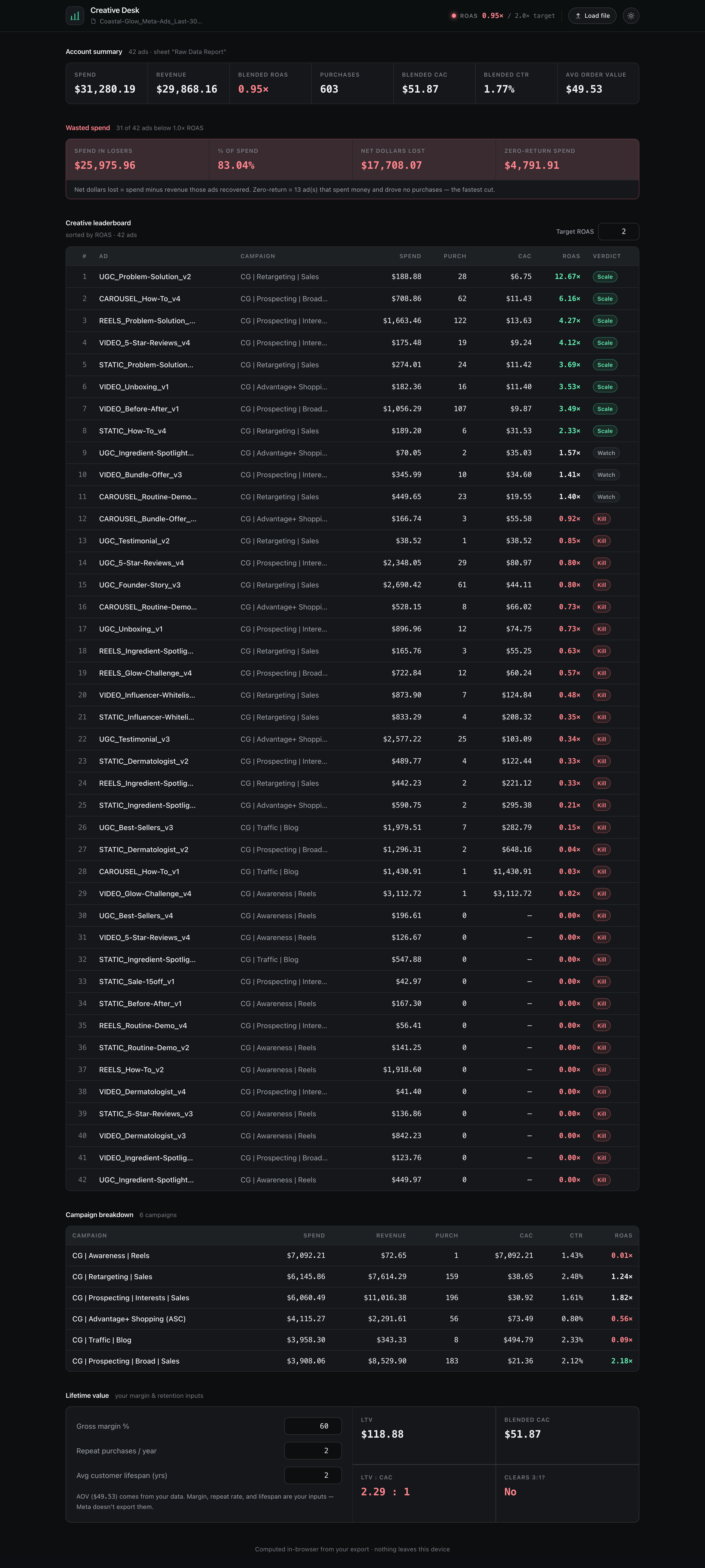
Make it work, then make it beautiful
Get the numbers right first. Then run the components and power-design. The order is the lesson. This is the real before and after of the calculator dashboard.
Ship it
Every builder drops their share link in chat before we close. Then everyone opens each other's boards, logged out, and leaves real feedback. Real hands find the bugs the operator never imagined, and they get fixed before the session ends.
Live URL:
What I built:
What annoyance it kills:
What I am adding Monday:
Takeaway
The URL proves the workshop happened. It is not the value. The value is the workflow: plan, verify, brief the senior, drive the stack. That compounds. The kit keeps producing after the four days end. The Prompt Architect turns any idea into a prompt, the Building Safely prompts cover you when you build for real, the components drop in, and the recordings stay.
← Back to the day list