Four live build days

Build the Claude Code system that gets smarter every time you use it.

This is the course command center: prework, Zoom, Day 1-4 pages, workspace download, skills, sketches, and the files we use live. Start with one folder. Leave with a setup Claude can read, use, and improve.

Why 1618? 1.618 is the golden ratio, a design shorthand for proportion. Creative strategy has the same job. It takes a pile of inputs and makes the shape feel obvious.

June 3, 4, 5 + 9 · 1:00 PM EDT · same Zoom link
Workspace download Day pages live 11 concept videos Sketch diagrams

Course command center
01Setup and operating principlesMax
02Creative workLuke
03The SurfaceLive
04App buildBonus
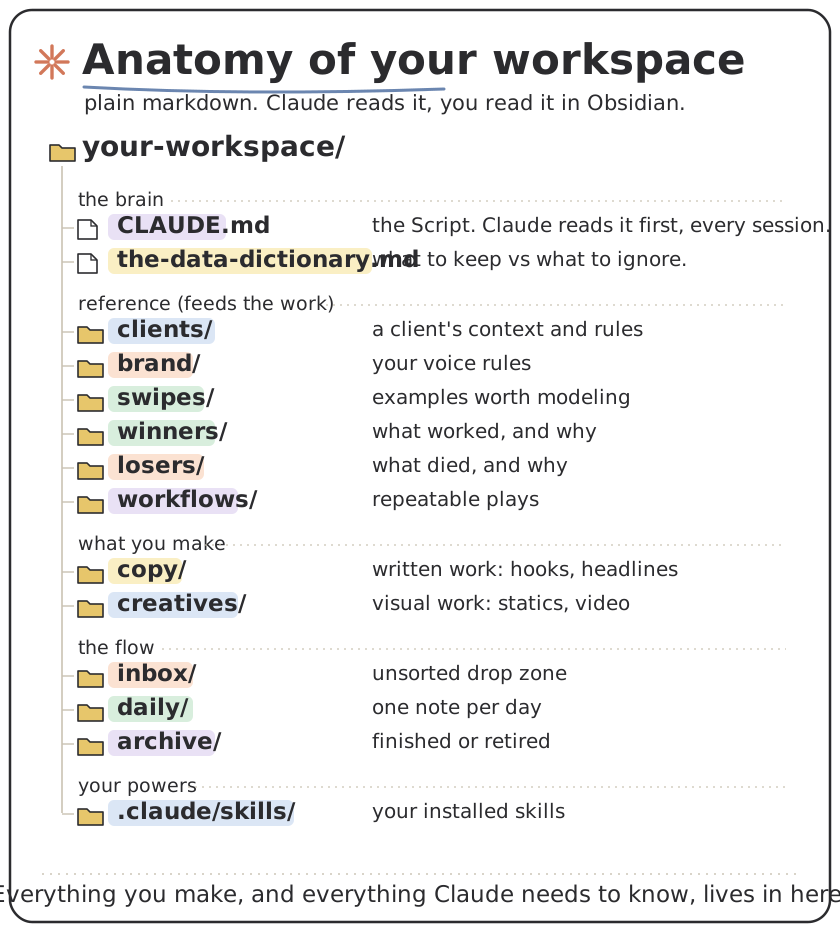
Sketch of the Claude Code Accelerator workspace folder.
Day 1 checkRead this workspace, name what you can see, then create ready-check.md with today's date.

The mechanism

Two flywheels. One workspace.

The 4 Days are the surfaces. The dual flywheel is the mechanism. One loop makes the setup smarter through the Script, skills, memory, organization, and views. The other makes your judgment sharper through principles, critique, verification, and the habit of saving the lesson.

AI flywheel

The setup gets smarter.

Claude reads better context, uses sharper skills, and leaves cleaner files behind.

  1. ReadScript, memory map, current files.
  2. ActUse the right skill and build the artifact.
  3. SavePromote the lesson so the next session starts ahead.
Judgment flywheel

Your taste gets sharper.

You compare the work against the principles, name what was off, and turn the correction into a rule.

  1. NoticeCatch the moment that feels wrong or right.
  2. CritiqueUse examples, principles, and concrete evidence.
  3. PromoteSave the rule where Claude will use it again.
Day 1Install the workspace and the save/promote habit.
Day 2Creative work trains the taste loop on hooks, ads, and examples.
Day 3The Surface connects reference mining, critique, deploy, handoff, and dashboard thinking.
Day 4App work turns a repeated task into a reusable tool.

Reference shelf

Open these when you need the map.

No extra homework. These pages explain the files, commands, dashboards, and Claude Code pieces we use during the live sessions.


Schedule

Four live sessions on Zoom.

One Zoom link for all four. Put them on your calendar now so nothing slips.

Same link every session: us06web.zoom.us/j/85990045769


Before Day 1

Two things. One takes two minutes today.

The other takes about 10 minutes the night before. Do them in that order and you arrive with Claude Code working, ready for the Day 1 workspace install.

Today: check your Claude access

Claude Code needs a paid Claude plan. Pro (about $20/month) is enough, and the free plan will not run it. This is the one thing that cannot be fixed at the last minute. If your account cannot open Claude Code, sort it now, not the night before.

How to check your access

The night before: open Claude Code once

Get Claude Code open and confirm you can see your files. About 10 minutes. We download and install the full workspace together on Day 1. I email you a reminder the night before too.

Open the prework page

What to bring

Bring real work, not a practice prompt.

The system only proves itself when it touches something real. Pick things small enough to finish, pulled from work you already needed to do.